
Measure time on the field, not time since arrival
The useful number is how long each player was actually on the field while your chosen match clock was running. A team clock alone cannot answer that question: seven players can accumulate minutes simultaneously, and a substitute should stop accumulating field time when they leave. Decide what you want to measure before choosing a rotation or pressing Start.
For a running-clock soccer match, a practical policy is to run your tracker during each playing period and pause at the interval. Follow your competition's actual timing and substitution rules; this is a recording method, not a statement that every youth league uses the same clock. If an interruption is excluded from your timing, exclude it consistently for everyone.
Write the policy in one sentence for whoever handles the phone: 'We record time while our match timer runs, pause between periods, and enter changes when players actually exchange.' BenchClock is a manual recording tool. It does not listen to the referee, synchronize with an official clock or know that a player has crossed the touchline.
Prepare the people before the timer
Open BenchClock through /app and use the account-free Free Tracker if you want to rehearse without a connected team. The Free Tracker stores its working state in that browser; it is not the same thing as an account-backed team history. Do not clear browser storage or assume that opening another device will reproduce the record.
Before recording time or stats, select the soccer preset in settings, check the field limit against your match format and enter the players who are available. Choosing a sport does not automatically choose the correct field limit. Use short, recognizable names, especially when two players share a first name. Keep the attendance list separate from guesses about late arrivals.
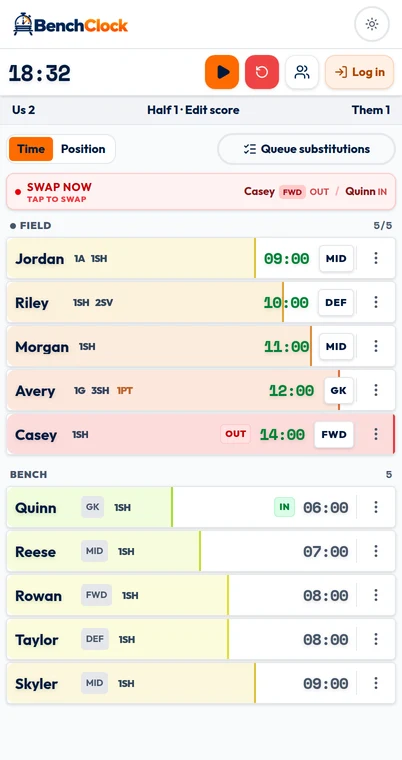
Put the actual starters on the field in the app while the timer is idle. Count the players on screen against the players preparing to start. If you want goalkeeper and outfield breakdowns, enable position tracking and assign current positions now; total playing time remains useful without that extra detail.
- Check attendance and the permitted number of players.
- Confirm starters, substitutes and any player temporarily unavailable.
- Choose a clock policy and one person responsible for recording.
- Practice one swap before match day, then clear only the rehearsal data.
Make one reliable record for each real substitution
Start the timer when your measured playing period begins. The active players accumulate time together; bench players keep their previous field totals. Those bench totals are not a second stopwatch measuring how long someone has been waiting. A player who has just come off can have a high field total even though their current rest has been short.
For a change, identify the outgoing player and incoming player and use the substitution controls to complete the swap when it really happens. Check both sides afterward. Announcing a substitute, asking them to get ready or reaching a planned rotation mark is not the same as entering the game.
BenchClock can surface a more-played field player and a less-played bench player as substitution guidance. Treat that as a prompt to review opportunity, not a tactical instruction or permission to substitute. Availability, goalkeeper coverage and your competition's allowed substitution moments still need a human decision. If three players change together, verify all three pairs rather than assuming the entire group was captured.
A worked 7v7 example: check the total before judging fairness
Suppose a fictional match has 40 measured minutes, seven players on the field throughout and ten available players. The team has 7 × 40 = 280 player-minutes to distribute. An equal share would be 28 minutes each. That is a planning benchmark, not a universal youth-soccer entitlement or a promise that every player can fill every role.
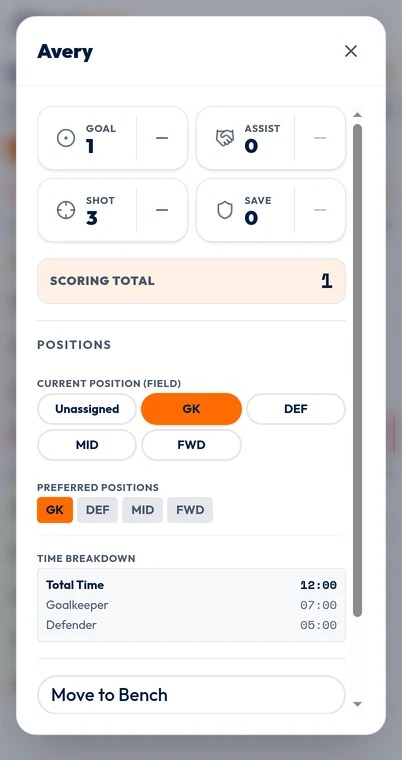
Consider one player, Avery. Avery starts, leaves at 12:00, returns at 20:00 and plays until 36:00. Their total is 12 + 16 = 28 minutes. The eight minutes from 12:00 to 20:00 and four minutes after 36:00 are not field time. If the match is paused for the interval, that interval must not inflate either Avery's total or the team's 280-minute budget.
At the finish, add the player totals. A result near 280 minutes supports the basic recording consistency; it does not prove every substitution was correctly attributed. If two players' names were swapped, the total could still be perfect. If only six players were actually on the field for two minutes, the correct budget becomes 278, not 280. Calculate from what happened, not just the nominal format.
Next look at the distribution. A 34-minute player and a 22-minute player create a question worth checking, but the numbers alone do not explain an injury, late arrival or goalkeeper arrangement. Write those facts beside your review rather than inferring willingness or effort from a timer.
Have an exception routine, not an imaginary perfect record
When a player arrives late, start their opportunity window when they become available; do not enter invented early minutes to make the chart look even. When a player is hurt, attending to them takes priority over the phone. Record what you can and make a separate note of any uncertain interval.
If you discover a missed substitution, make the current on-field group accurate first. If the confirmed change appears under Tools, Undo & correct, the Free Tracker can preview a corrected elapsed time and recalculate player and position totals without changing the clock, score or stats. If no reconstructable event exists—or the time is only a guess—keep an external note. Do not reset the match to hide the error.
Pause at the end of the measured match and review before any reset. Confirm the final active group, scan for implausible totals and preserve your summary in the workflow you chose. Free Tracker matches and connected-team reporting are different: account-backed team features require the appropriate signed-in access.
Use the record to make the next decision easier
A useful review produces an action such as giving a frequently benched player an earlier first spell, arranging a planned goalkeeper exchange or assigning an assistant to handle substitutions. It does not need to rank children. Share the timing definition and known gaps if you discuss minutes with families, rather than presenting the display as independent proof of everything that happened.
For your first attempt, track only participation and substitutions. Add positions or quick stats after the basic routine is dependable. Open /app for a short rehearsal with fictional names, practice pause and resume, and verify that a completed swap changes the correct two players. The best recording routine is the one you can actually maintain while coaching.