
Reduce the job to the information you truly need
When you coach alone, substitution tracking competes with instruction, supervision and the game itself. The solution is not to remember more. It is to make fewer live decisions and record only the information you can maintain without neglecting the players.
Start with participation and current lineup. Optional scoring and position details can wait if recording them makes you miss a change. A reliable minutes record is more useful than an ambitious collection of half-observed statistics.
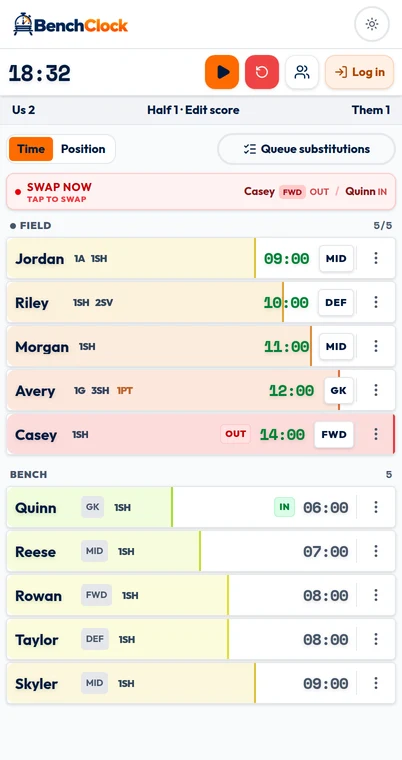
The routine below can use a small paper planning card alongside a timer. BenchClock also has a Queue substitutions control for preparing named outgoing/incoming pairs. Both are manual drafts: neither generates a tactical rotation, watches the clock for a target minute, nor sends players automatically.
Check your competition’s substitution procedures and your organization’s supervision requirements first. Being the only coach is not permission to bypass either. If the situation requires more adult support than you have, address that staffing issue rather than expecting an app to solve it.
Before the match, prepare a short rotation card
Confirm who is present and available, then mark the starting group. Recalculate the plan if the roster has changed. A rotation designed for ten players can become confusing with eight, especially if you continue reserving turns for children who are not there.
Write only the next two changes in large, readable text. For a fictional example: ‘Next: Alex for Casey, left side. After that: Jordan for Morgan, central.’ Add an approximate review window rather than a promise to substitute at an exact second. You can keep this as a paper note or enter the pairs in BenchClock's manual queue; neither form is a scheduled instruction.
Keep a separate list of players who need a participation check at the break. That list is not a public label or a guarantee of immediate entry. It is a reminder to notice someone who might otherwise get overlooked while you respond to the game.
In BenchClock, verify the active-player limit and starting lineup before starting the clock. Practice with fictional players first: selecting a bench player while there is an empty active place can send them directly into play. Do not confuse an actual change with a private plan for later.
- Present and available players confirmed.
- Starting group and player limit checked.
- Next two changes written as incoming/outgoing pairs.
- Clock convention and break routine decided.
- Device charged and paper fallback within reach.
During play, use prepare, confirm, record
Prepare: at a suitable moment, tell the incoming player whom they will replace and what role to take. Keep the instruction short enough that they can repeat it. A child who knows their task needs less last-second explanation when the opportunity arrives.
Confirm: follow the official substitution procedure and watch the actual change. Check that the outgoing player returns safely and that the active-player count is right. A planned change does not become a recorded fact merely because you announced it.
Record: enter the change promptly when doing so is safe, then verify the screen matches the players in action. In the local BenchClock tracker, selecting a field player and a bench player performs the pairwise swap. The timing reflects the recorded action; the app does not see when a player crossed a line.
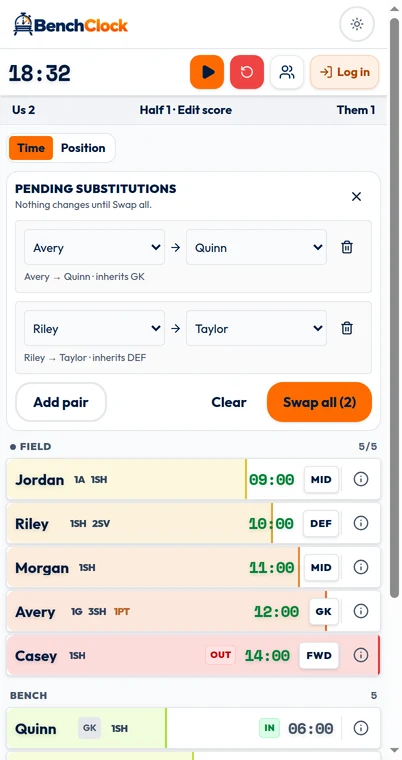
For a double change, keep each outgoing player paired with one incoming player. ‘Alex for Casey; Jordan for Morgan’ is easier to verify than remembering two incoming and two outgoing names as separate lists. You can record each actual swap separately, or open Queue substitutions and build both pairs for one checked batch.
The order is important: player supervision and the permitted change come before data entry. If you cannot safely look down, wait. An imperfect record is preferable to missing something that needs your immediate attention.
Use Queue substitutions as a short manual draft
Select Queue substitutions to open Pending substitutions. Add pair creates a row using an unused Field player and an unused Bench player; use the two selectors to choose the actual outgoing and incoming names. Add more rows only when you can verify every pair. Each player can appear only once in the draft.
When position tracking is on, each row states that the incoming player inherits the outgoing player's current position. Review that inherited role rather than assuming a preferred position was chosen. If the lineup, position catalog or assignments change while the editor is open, BenchClock asks you to review every pair before sending.
Nothing changes on the Field or Bench while the pairs are merely pending. At the permitted moment, confirm the real change, check every row, and select Swap all. That action submits the listed pairs together; it is not a timer, reminder, or scheduled automation. Clear removes the rows, and closing the editor cancels the draft.
The pending queue lives only in the current browser page. Refreshing or leaving the page clears the draft, so do not use it as durable match planning. Keep the paper fallback for changes you must retain, and rebuild the on-screen pairs from the real current lineup after any refresh.
Use bench information as a prompt, not an automatic order
At a natural pause, compare the waiting group with recorded participation. Who has played least? Who has been waiting longer than intended? Then check the plan against the current situation: fatigue, a player asking for a rest, role readiness or a safety concern may change the next pair.
BenchClock’s local screen separates active and benched players and provides timing-based substitution guidance. It does not know every reason a player may be unavailable or why two players should not be exchanged directly. You remain responsible for the choice.
Avoid revising the entire match plan after every event. Change the next pair when necessary and preserve the broader opportunity target. Constantly rebuilding the rotation adds attention costs and makes it harder to explain why someone was repeatedly passed over.
When you miss an entry, recover honestly
Suppose you realize Alex entered earlier but still appears on the bench. First establish the real lineup. Correct the active state when safe. If the missed change appears in Match tools under Undo & correct, you can preview a corrected elapsed playing time; otherwise note the approximate missed interval separately. Do not leave the screen wrong while reconstructing every second.
Distinguish certain facts from estimates. ‘Alex entered at the timeout’ may be verifiable; ‘probably about two minutes ago’ is not an exact timestamp. Corrections recalculate player and position totals but leave the live clock, score and stats unchanged. Older changes without reconstructable journal evidence cannot be retroactively edited, and only the latest eligible substitution can be undone.
If several changes were missed during an injury or another urgent interruption, simplify for the rest of the match. Resume reliable lineup and time recording, omit optional stats, and mark the affected record as incomplete in your own review notes. Never prioritize repairing data over responding to the incident.
At the break and finish, close the loop
At a period break, check the clock state before discussing totals. If the tracker continued running during a break, the figures may include time you did not intend to count. Review your timing convention rather than immediately blaming the rotation.
Compare the least-played players with your remaining plan. A fictional player on eight minutes while most teammates have twelve may need an earlier opportunity next period. Confirm availability and roles, then write the next two pairs. Avoid promising exact compensation before checking how much time remains.
At the end, stop recording promptly and verify the actual final lineup and any known gaps. Use the appropriate connected match completion flow if maintaining team history; a browser-local session is not automatically a connected season record. Account-backed analytics require sign-in and suitable access.
Keep a paper fallback: list the starting group and jot each change with the match-clock time. If the phone becomes unusable, continue coaching and recording only what you can verify. To practice the digital side, open /app and rehearse one period with fictional players. The goal is a routine simple enough to survive a distraction, not a perfect log at the expense of watching the game.