
Distinguish cumulative ice time from a shift log
There are two different questions behind hockey time tracking. 'How much did this player play?' needs cumulative active time. 'How long was each individual shift, and how much rest followed it?' needs a dependable sequence of shift start and end events. Do not assume that a tool answering the first question automatically answers the second.
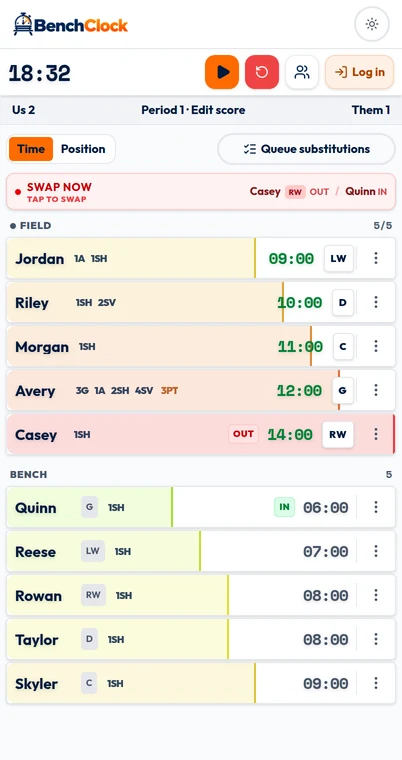
BenchClock records manually entered active and bench changes and accumulates playing time. Total shows cumulative participation, Stint shows the current uninterrupted active interval, and Wait shows eligible bench waiting time. Those live views and optional position buckets add context, but they are not automatic shift detection, wearable tracking, or a historical shift-duration chart.
For a youth bench, a reliable participation total can still be useful. It can help identify a player who repeatedly misses a turn or expose a recording routine that becomes unmanageable during rapid changes. Start with the question you can actually answer from the data you can collect.
Agree on the clock and who is included
Choose whether your record follows official elapsed playing time or a running observation clock. Official-time ice minutes require pausing and resuming the tracker with the actual game clock. A running observation includes time spent waiting on the ice during stoppages. Both can be described honestly, but they are not interchangeable.
Use your competition's timing and substitution rules, including any modified youth format. This guide does not prescribe shift lengths, roster sizes or substitution permissions. BenchClock does not synchronize with the rink clock or determine when a change is legal.
Decide whether you are tracking all active players including the goalie or a skater-only pool. If the goalie is included, count that place in your active limit and team-minute budget. If excluded, say so in every summary. Combining skater-only totals with an all-player budget creates a discrepancy before the first change occurs.
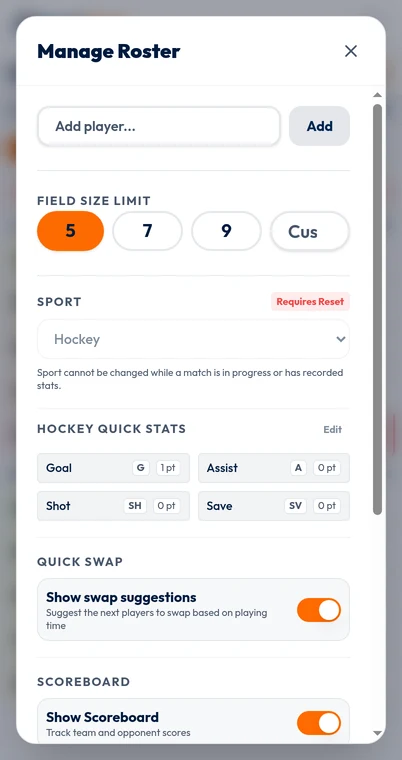
Open /app for a local rehearsal, choose Hockey before recording time or stats, set the correct active-player limit and enter recognizable names. Selecting the preset does not set the limit for your competition. Mark the actual starters as active and check the count before beginning.
Worked example: a line change is not one simultaneous event
Suppose three fictional forwards begin a measured spell together. At 0:42, Alex is replaced by Drew; at 0:45, Blair is replaced by Ellis; at 0:49, Casey is replaced by Finley. If the tracker is running throughout, the outgoing players have recorded spells of 42, 45 and 49 seconds respectively.
Entering all three changes at 0:45 makes Alex three seconds too long and Drew three seconds too short. It makes Casey four seconds too short and Finley four seconds too long. The team's total can still balance because each early or late change transfers time between two players. That is why a correct grand total cannot prove accurate individual ice time.
If you can observe and enter each pair, do so when the exchange actually occurs. Afterward, verify the active group. If the pace only permits grouped entries, choose a consistent convention, note that limitation and avoid presenting the result as second-perfect. A practical approximation is acceptable when openly described; false precision is not.
Do not interpret this fictional 42–49 second example as recommended shift duration. Appropriate participation and rest depend on the setting, player needs and qualified coaching judgment. The example exists only to show how recording delays affect the arithmetic.
Give the observer a manageable job
Rapid changes make attention the limiting resource. If a coach is also responsible for supervision, line organization and communication, expecting them to enter every change plus shots, assists and saves may produce a detailed-looking but unreliable record.
Where another responsible adult can help, assign one recorder and one clear callout convention. Call names or agreed identifiers in an order such as 'Alex off, Drew on.' Confirm unusual changes separately rather than assuming an entire line entered together. Avoid two people tapping the same change on independent assumptions.
Prioritize current active players first, cumulative time second, and extra stats only when those foundations are stable. Keep a simple paper note available for uncertain moments. The goal is not to turn the bench into a data-entry station at the expense of the players.
A goalie change, an extra attacker or a situation with fewer active players needs explicit recording. The app does not infer penalties or personnel changes from the scoreboard. Record who is actually participating, and follow the competition's rules rather than treating the on-screen limit as a rule authority.
Recover honestly after a missed change
When you notice an error, restore the correct current active group first. If a confirmed change has reconstructable journal evidence and a known elapsed time, Tools, Undo & correct can preview a timing correction. It recalculates player and position totals, not score, stats or the live clock. There is no general historical shift editor, so keep an external note when the event or time is uncertain.
If a player appears to have a very long spell, it may mean they played continuously or that an exit was missed. Check the recording before treating it as a workload conclusion. Cumulative ice time is not a medical measurement, and it does not reveal intensity, fatigue or recovery.
If coverage was lost for most of a period, say that the record is partial. It may still support a limited question about the periods observed. It should not be stretched into a complete-match comparison. Accuracy includes being clear about what was not observed.
- At a stoppage, compare the app's active names with the real group.
- Confirm timer state against the chosen clock policy.
- Record whether uncertain time belongs to an individual pair or an entire interval.
- Keep safety and supervision ahead of repairing the data.
Reconcile ice-time totals using the actual player count
For a fictional 30-minute measured game with six tracked players active throughout, the all-player budget is 180 player-minutes. If one goalie plays all 30, that leaves 150 skater-minutes. With ten skaters, 15 minutes each is an equal-share reference, not a required allocation.
If there are only five tracked players active for two of those minutes, the all-player budget falls to 178. More generally, add active-player count × duration for each interval with a different count. An extra attacker replacing a tracked goalie may change role totals without changing the all-player count.
Pause at the end, inspect implausible totals and retain the notes that explain uncertainty. Compare goalie and skater opportunity separately when that distinction matters. A timer can support a conversation about participation; it cannot judge the quality of a player's decisions or effort.
Try a short fictional hockey rehearsal through /app before using the system at the rink. Practice a staggered three-player change and a stopped-clock restart. If the manual workload is too high, narrow the task or arrange recording help rather than promising automatic shift analytics that are not there.