
Choose the job before the app
The best playing-time app for your team is the one you can operate accurately while watching the game. Start with the problem you need to solve: knowing who has played, making the next substitution, keeping an official score, or reviewing a season. Those are different jobs. A polished scoreboard can still be a poor individual-minute tracker, and a useful timer need not replace your team calendar.
This guide is published by the makers of BenchClock. It is a selection framework, not an independent review, a competitor ranking, or a claim that our product fits every coach. Use the same rehearsal and checklist with any shortlisted tool, including a paper rotation sheet.
Write one sentence describing your requirement. For example: ‘I need to see each available player’s minutes and record a two-player change without losing sight of the field.’ Then list nice-to-have features separately. This prevents a large feature list from distracting you from the task you will repeat twenty times during a match.
Run a substitution rehearsal, not just a product tour
Create a fictional roster with similar names and the largest bench you expect. Set the playing limit to your actual format. Start a short practice clock, put the correct number of players into play, make one replacement, then make two consecutive replacements. Pause and resume. Check whether you can explain exactly which players are accumulating time at each stage.
Include an interruption. Select an incoming player, look away as though answering a child, then look back. Is the pending selection clear? Can you cancel it without accidentally making a change? A tool that feels obvious during uninterrupted setup may be confusing when a substitute asks where to stand.
Test the screen on the device you will actually carry. Small controls, glare, a case covering an edge, and names wrapping onto several lines can matter more than an extra chart. Do not conduct the first usability test while responsible for a live match.
- Can you distinguish selected, playing and benched players at a glance?
- Can you handle an absent player without counting them as waiting for minutes?
- Can you record an injury-related removal without immediately adding a replacement?
- Can you stop timing reliably at the end of a period?
Separate recorded time from coaching interpretation
A game clock measures the match. Player timers measure the intervals you recorded for individuals. Bench waiting time answers a third question. Ask which of these an app actually tracks and how pausing affects them. Decide whether your figures represent running-clock participation or official stopped-clock minutes before comparing players.
Automatic arithmetic is not automatic observation. Unless a product explicitly provides and demonstrates another mechanism, someone must record substitutions. An accurate timer cannot know that you sent a child on ninety seconds before tapping. More decimal places do not fix a missed event.
Likewise, a least-played suggestion is useful information, not a complete selection decision. Injury, willingness to play goalkeeper, competition requirements and readiness still matter. Prefer a tool that makes the evidence readable while leaving the coach in control rather than treating a suggested name as an instruction.
Check storage, permissions and sharing separately
Ask where the data lives. Browser-local storage and an account-backed team are not interchangeable. A local practice session is convenient, but you should not assume it will appear on another device or remain after browser data is cleared. If history matters, rehearse the exact save-and-reopen workflow before trusting it with a season.
Next, identify who can edit, who can review and who can merely follow a match. Sharing a live view with a family should not be assumed to grant coaching permissions. Test access using the intended role, not only the account that created the team. Ask how access can be withdrawn and whether you understand what a shared link reveals.
Use fictional names while evaluating products. You rarely need birthdays, contact details or identifying notes to decide whether a substitution control works. Follow your organization’s rules before entering children’s information or distributing individual records. Convenience does not replace permission.
Use a pass-or-fail worksheet
Choose three non-negotiable requirements and give each candidate a pass, fail or untested result. For a solo coach, those might be readable simultaneous timers, a reliable swap interaction and a recoverable record after a normal interruption. For a staff team, authorized collaboration and saved history may be essential instead.
Run a fictional ten-minute session and write down what went wrong, not just what looked attractive. Suppose the tracker handled substitutions well but you forgot six scoring events. That is evidence to simplify your workflow, not necessarily to buy more statistics features. Try minutes-only tracking before deciding the whole tool is unsuitable.
Check current pricing, device support, account requirements, export options and support information directly with the provider before committing. Product terms change. This guide deliberately does not preserve a price comparison that could become misleading.
- Must have: a capability whose absence prevents your workflow.
- Useful: a capability that saves effort but has a workable alternative.
- Unnecessary: a feature you would not realistically operate or review.
- Untested: a claim you have not yet verified on your device and account.
Where BenchClock fits—and where to be cautious
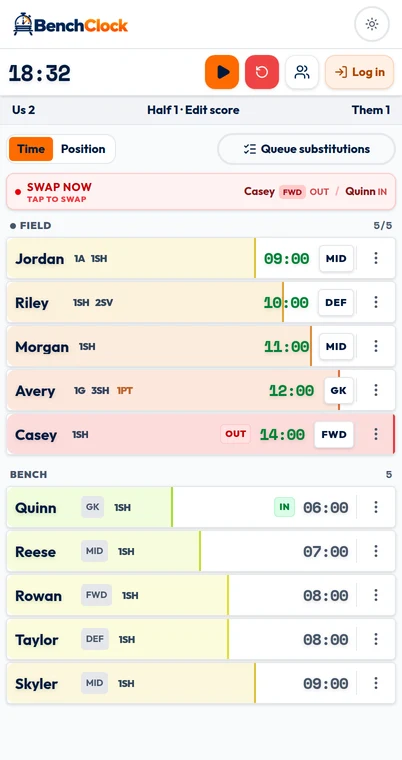
BenchClock combines individual playing-time tracking, manual substitutions, optional position tracking and configurable quick stats. Its presets include soccer, basketball, hockey and Other/Custom. Player scoring stats automatically update Us on the displayed scoreboard; Them remains manual, and other points or corrections remain visible in the breakdown.
The image below shows the local match interface used to enter information, not an authenticated season report. Connected team history and analytics require sign-in and appropriate access. A local screenshot does not establish what a parent or assistant can see in a connected team.
BenchClock does not synchronize to an official clock or automatically execute tactical changes. Its optional Rotation plan can generate a proposal and expected minutes from current eligibility, but the coach reviews the plan, loads a group and confirms the live queue. It is not a complete fairness policy or tactical decision-maker. Open /app and run a fictional rehearsal before entering a real roster.