
Start with your match format, not a formation graphic
A useful soccer playing-time tracker should answer three questions quickly: who is on, who is waiting, and how much opportunity each player has received. An attractive pitch diagram is optional. Accurate changes and a roster that matches the players actually available are more important.
This is a product-maker guide from BenchClock, not an independent ranking of soccer apps. The aim is to help you evaluate a tool against your own format. Check your competition’s rules for roster limits, substitution opportunities and participation requirements; youth soccer does not have one universal policy covering every league.
Before a trial, write down the number of active players, expected match duration and typical available roster. Include the goalkeeper in the active-player count. Then test both a normal week and the awkward week when two children are absent and another arrives late. A tracker should make those situations understandable without pretending your ideal roster is always present.
Use a goalkeeper-aware budget to test the display
Consider a fictional 40-minute, seven-player match with ten available players. The total participation budget is 7 × 40 = 280 player-minutes. An equal overall share would be 28 minutes each. That arithmetic is a planning reference, not a claim about your league’s match length or required distribution.
Now suppose one player keeps goal for all 40 minutes. The remaining six active places provide 240 outfield minutes, shared among nine players: about 26 minutes 40 seconds each. Overall totals will not be equal. If the goalkeeper is also supposed to receive outfield experience, a different plan is needed before kickoff, not an explanation invented afterward.
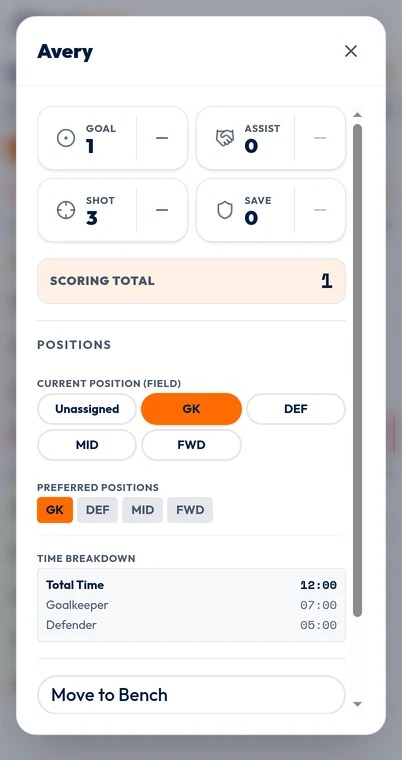
This is why position time can matter. A total of 28 minutes does not tell you whether a child played 20 in goal and eight outfield or all 28 at defender. Ask whether the tracker distinguishes total participation from role-specific intervals and whether you can update a role without incorrectly recording a substitution.
In BenchClock, optional position tracking records time under assigned positions. The position editor image is an example of those recorded inputs and buckets. It is not a recommendation about how long a child should keep goal, nor evidence that the app chooses a goalkeeper rotation for you.
Rehearse the changes that are easy to get wrong
A one-for-one substitution is the simplest test. More revealing is a double change involving similar names, followed by a position switch among players who remain on the field. Practice this with a fictional roster and verify the resulting lineup before continuing the clock.
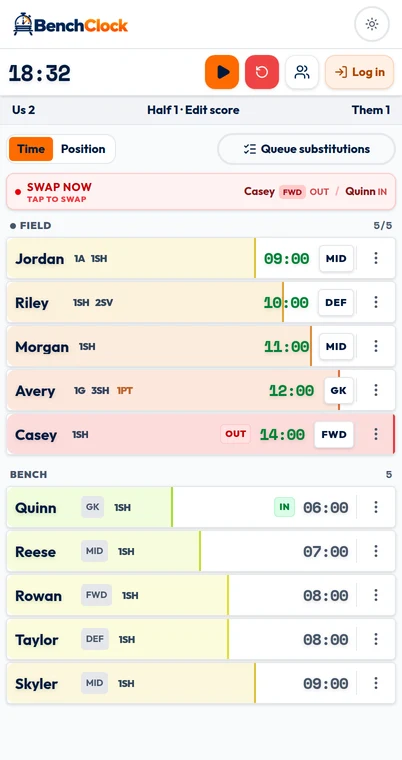
In the local BenchClock tracker, selecting a field player and then a bench player performs a swap. If there is a vacant active place, selecting a bench player can add them directly. That distinction matters during setup or after a removal: a tap may mean ‘enter the game’ rather than ‘queue for later.’ Learn the behavior before match day.
A replacement can inherit the outgoing player’s active, non-retired position assignment. That is convenient when the role stays the same, but it still needs checking when your change includes a tactical reshuffle. A recorded label is only as accurate as the coach’s update.
Test the actual number of taps and the clarity of the selected state rather than accepting a general ‘easy substitutions’ promise. The best interaction for a coach holding the device continuously may not suit someone who checks it only at stoppages.
- Replace two players in succession and verify both pairs.
- Remove a player without immediately filling the place.
- Change a position while keeping the same player active.
- Check whether the waiting list helps identify overlooked players without dictating your decision.
Agree on what the clock means
Choose a timing convention consistent with the information you need. You might track participation against a running match clock, excluding halftime, rather than attempting to estimate only seconds when the ball is moving. The important point is to state the convention and apply it consistently.
Do not assume the app knows when the referee starts or stops the official clock. BenchClock timing is manually controlled; it is not synchronized with officiating equipment. If you pause for an extended interruption, remember that the player-time record will reflect that decision.
Substitution permission is another separate question. A plan to rotate around minute ten does not authorize a change at that instant. Follow the competition rules and officials, then record the change when it happens. A useful tracker accommodates the actual event; it should not pressure you into treating a planned interval as a rule.
Look for history you will actually use
Ask what you want to review next week. For many coaches, useful questions are modest: who received little outfield time, whose last two appearances were shortened, and which players have not tried a role? A complicated scoring dashboard is less valuable if it cannot answer those participation questions reliably.
When evaluating saved history, distinguish a browser-local session from a connected team record. In BenchClock, connected-team analytics require an account and appropriate access. The soccer screenshots here demonstrate the local input interface; they do not show authenticated team or player analytics.
Also check how position and stat definitions are preserved. Comparing unlike labels or changed scoring values can produce a misleading season story. Prefer reviewing compatible records and explaining gaps to combining every number into one apparently precise total.
Make the selection with a short acceptance test
Give your preferred tracker one fictional half to prove itself. Start with the correct roster, make three planned changes and one unplanned change, pause for the break, then explain each player’s total and goalkeeper contribution without guessing. If you cannot do that, identify whether the problem was the interface, your recording routine or an unclear policy.
Reject unnecessary complexity. A coach who only needs minutes may reasonably skip scoring and positions initially. Add position tracking when role opportunities become a real coaching question, not simply because the switch exists.
To try BenchClock’s soccer workflow, open /app and rehearse with fictional players. The optional Tools planner can generate a proposal and expected totals, but it does not create a complete fair-play policy or automatically execute a tactical schedule. The operator must load, review and confirm each live queue.