
One total can answer the wrong question
A player who spends 30 minutes in goal and a player who spends 30 minutes in midfield have equal recorded participation. They have not had the same role experience. If your coaching goal includes trying different positions, you need both total field time and the portion spent in each role.
Keep the measures separate. Total participation answers, 'How much did this player play?' Goalkeeper time answers, 'How much of that participation was in goal?' Outfield time can be summarized from known defender, midfielder and forward assignments. Do not simply subtract goalkeeper time from the total if some minutes were unassigned or position tracking was off.
There is no universal rule that all youth players must have the same goalkeeper allocation. Use your competition rules, club policy and the players' readiness to establish the arrangement. This guide concerns recording that arrangement accurately, not deciding who should be required to play in goal.
Set the vocabulary before the first whistle
In BenchClock's soccer settings, the position catalog starts with Goalkeeper, Defender, Midfielder and Forward. Those broad roles are enough for a useful first review. Adding left and right variants can help a specific coaching question, but every extra distinction creates more opportunities to miss a change.
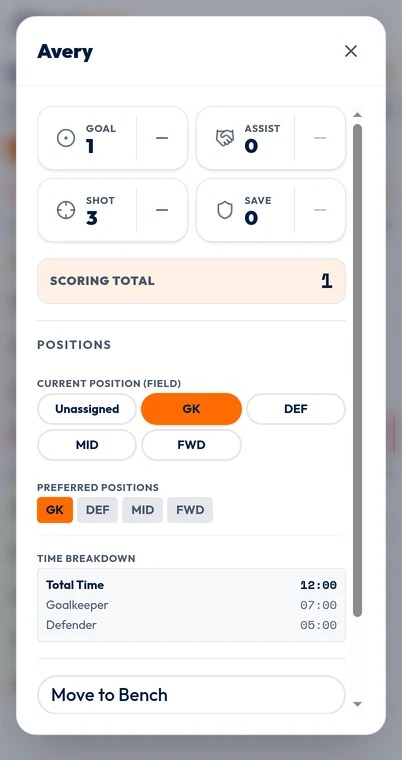
Enable position tracking while the match is not running. Then open each starter's player controls and choose their current position. Preferred positions are a different field: they describe choices associated with a player, not proof that the player is currently occupying one of them. Check the active assignment rather than relying on a preference badge.
Set up the sport and position vocabulary before recording a real match. Switching sport after recorded time or stats is restricted, and switching presets is not a way to preserve a mixed-sport record. If you only discover the need for role tracking after kickoff, keep the earlier gap explicit instead of claiming the app reconstructed it.
The screenshot shows an actual player detail editor with synthetic goalkeeper and defender buckets. It demonstrates where role time is recorded; it is not a report about a real child or a guarantee that your own assignments will be complete.
Worked example: a goalkeeper exchange at the interval
Consider a fictional 40-minute match split into two measured 20-minute periods. Rowan starts in goal and Casey starts as a defender. Both play throughout. At the interval they exchange roles. Rowan should finish with 40 total minutes: 20 Goalkeeper and 20 Defender. Casey should have the same total with the roles in the opposite order.
At the end of the first period, pause your tracker according to the agreed clock policy. While paused, change Rowan's current position to Defender and Casey's to Goalkeeper. Resume when the next measured period begins. Because the exchange happens while paused, neither player's interval break should become position time.
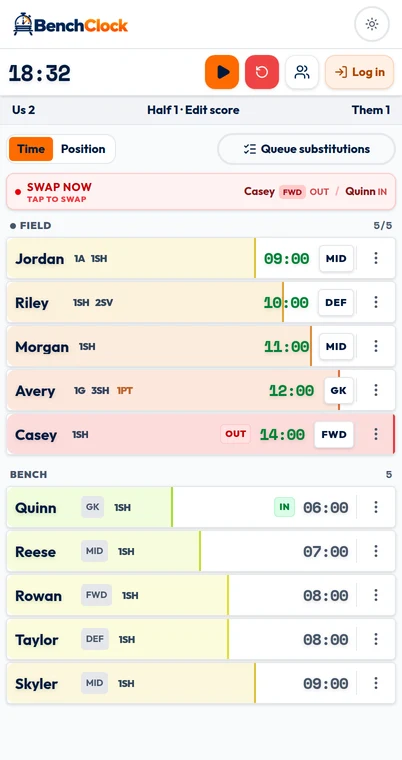
This is a role exchange, not a bench substitution. Sending both players to the bench and bringing them back is unnecessary when both remain active. A current-position change closes the previous recorded role interval and starts the next under the current timer state. You still need to tell the app which role each player now has.
If the exchange happens during a running period instead, record both role changes as promptly as possible. The device cannot know the exact exchange time unless you enter it then. A small delay should be treated as recording uncertainty, not as evidence that one player occupied two roles.
A substitution can carry a role forward
When BenchClock swaps an incoming player for an outgoing player, the incoming player inherits the outgoing player's active, non-retired position when one is available. That is convenient when a substitute takes the same role. It is not automatic tactical recognition.
Suppose Morgan replaces defender Lee but the coach simultaneously moves midfielder Alex into defense and asks Morgan to play midfield. The swap alone can leave Morgan labeled Defender. You must update Morgan and Alex to match the real arrangement. Otherwise the total field minutes can be correct while the position breakdown is wrong.
Likewise, verify the assignment after a goalkeeper substitution. A player added without a paired outgoing role may be unassigned. Before play resumes, check that the active goalkeeper in the tracker is the person actually in goal and that nobody else has retained an unintended goalkeeper label.
A quick verbal routine helps: 'Player in, player out, role confirmed.' It is especially useful when one person calls substitutions and another uses the device. The recorder should repeat what happened rather than assume that a substitute took their usual position.
Audit the breakdown without inventing missing minutes
For each player, compare total playing time with the role buckets, including any unassigned or not-tracked time. Known goalkeeper plus known outfield minutes should not be treated as the complete total when there are uncovered intervals. A missing assignment is a data-quality fact, not an outfield position.
Imagine Drew has 30 total minutes: 10 Goalkeeper, 14 Defender and 6 Unassigned. The defensible summary is '10 recorded goalkeeper minutes, 14 recorded defender minutes and 6 minutes without a role assignment.' Calling it 20 outfield minutes would assume what happened during the missing six. If a coach independently remembers the interval, preserve that explanation separately rather than silently changing the interpretation.
At team level, a fictional match with one goalkeeper present for all 40 measured minutes should contain about 40 goalkeeper player-minutes. A much higher or lower sum is a prompt to inspect assignments. It is not proof of misconduct or an instruction to force the data to equal 40; there may have been an actual period without the expected coverage or a late recording start.
- Confirm that every active player has an intended current position.
- Review exchanges separately from bench substitutions.
- Look for unassigned and not-tracked intervals before adding outfield totals.
- Check unusual goalkeeper totals against notes about the match.
- Keep uncertain observations visible in any explanation.
Turn the role record into a modest coaching question
A useful conclusion is, 'Casey had very little recorded outfield opportunity this week; should the next suitable session include more?' An unsupported conclusion is, 'Casey is only useful as a goalkeeper.' Role time measures exposure, not skill, confidence, enjoyment or the quality of the experience.
Keep the review proportionate and private. If discussing a player's opportunity with their family, explain the role policy, the recorded totals and any missing intervals without displaying teammates' personal circumstances. Positions should help you plan experience, not create labels that follow children indefinitely.
Open /app to rehearse a two-player role exchange before using it in a match. Practice once with the clock running and once while paused, and inspect the resulting buckets. If managing roles distracts from supervision, start with total field time and add position detail only when the recording routine is reliable.