
Track the role question you can answer
Position time adds a second layer to ice-time recording: not just whether a player was active, but which role they were assigned during that time. That can help answer whether a player had opportunities at center, on a wing or in defense. It does not tell you where they skated on every play.
Before enabling another set of controls, write the coaching question. 'Did our developing centers get recorded experience in that role?' is narrower and more useful than 'Track everything.' If all you need is total participation, position entry adds work without necessarily improving the decision.
BenchClock uses manually selected current positions and accumulated role buckets. It does not recognize positions from movement, locate players on the ice or produce dedicated shift-duration analytics. The record is only as complete as the assignments and substitutions entered by the observer.
Use the smallest useful vocabulary
The hockey preset provides Goalie, Defense, Left Wing, Center and Right Wing. Start with those meanings and agree on them with the recorder. In particular, decide whether a temporary tactical movement changes the player's assigned role. Usually a brief movement across the ice is not the same as a planned position change.
Avoid creating a new label for every line combination or game situation. 'Second line left wing while trailing' mixes position, unit and score context into one category. The resulting buckets are difficult to compare and hard to maintain live. A small stable vocabulary is easier to explain.
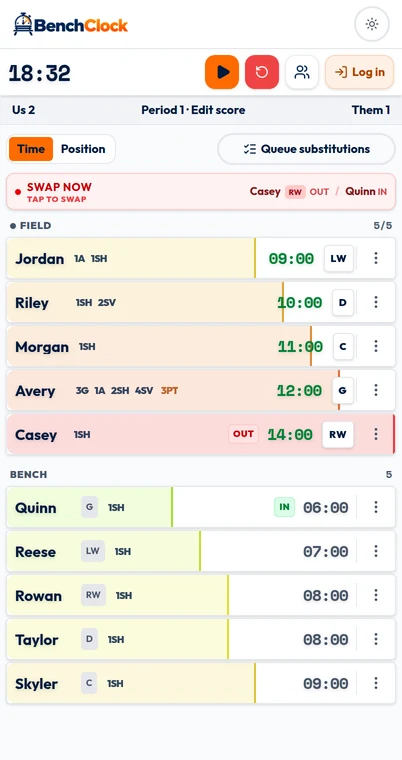
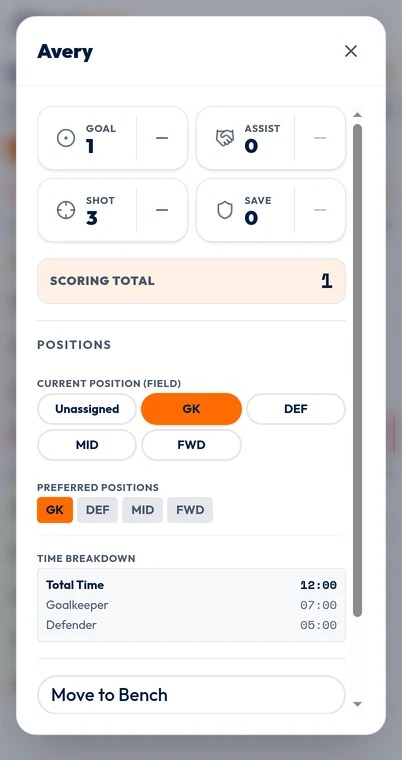
Choose Hockey before the match contains time or recorded stats. Enable position tracking while the tracker is not running, then select a current position for each active player in their controls. Preferred positions are not live assignments: a player can prefer Center while currently playing Right Wing.
Check your active limit separately from the sport preset and confirm whether the goalie is included in the tracked group. Both choices affect the review later. Rehearse through /app with fictional players so you can inspect a role change without putting a real match record at risk.
Worked example: one player, two roles and a bench interval
Suppose Morgan starts a fictional measured sequence at Left Wing. After three accumulated playing minutes, Morgan moves to Center without leaving the ice. After two more measured minutes, Morgan goes to the bench. Later Morgan returns at Center for four measured minutes.
Morgan's total is nine active minutes: three at Left Wing and six at Center. The bench interval contributes no active position time. These are deliberately simple arithmetic blocks, not recommended continuous shift lengths or a statement about how youth hockey should be coached.
Record the first role change by changing Morgan's current position while Morgan remains active. The app finalizes the previous role interval and begins the next under the timer's current state. Record the later exit and return as actual substitutions. A position change and a bench change are different events.
If the tracker is paused during a stoppage and Morgan changes role before the restart, update the assignment while paused, then resume at the next measured play. If the clock runs during the change, the timing reflects when the recorder enters it. The app cannot recover an earlier role exchange it was never told about.
Check the role after every unusual substitution
A paired substitution in BenchClock can pass the outgoing player's current, non-retired position to the incoming player. That saves an extra step when the substitute takes the same role. It is a convenience rule, not awareness of your line combinations.
For example, Quinn replaces a player labeled Left Wing but is actually entering at Center, while another active player moves to the wing. Without explicit changes, Quinn can inherit the wrong role and the other player's old assignment can remain in place. Both players' cumulative ice time may be correct while their position totals drift.
After a straightforward like-for-like change, glance at the inherited role. After a reshuffle, verify every affected active player. When someone is added without an outgoing role to inherit, check for an unassigned state rather than assuming their preferred position became current.
Give the recorder a clear role callout only when the role really changes. 'Quinn for Ellis, now center; Morgan moves left' is more actionable than 'new line.' If nobody can communicate the reshuffle accurately, leave the uncertain assignment explicit instead of inventing one later.
Unassigned time is a warning, not a position
A role review should reconcile each player's total active time with their role buckets, including unassigned or not-tracked intervals. Turning on position tracking midway through a match does not reveal roles from the earlier part. Keep that distinction visible.
Imagine Riley has 12 total active minutes, with five recorded at Defense, four at Right Wing and three without a role assignment. You can confidently say that nine minutes have named role coverage. You cannot say that Riley spent seven minutes at forward by automatically adding the three unknown minutes to Right Wing.
For a simple completeness check, divide named-role minutes by total active minutes. Riley's coverage is 9 ÷ 12 = 75%. That is a worksheet calculation, not a claim that BenchClock supplies a dedicated position-coverage metric. It describes documentation completeness, not player performance.
If your observation was interrupted, keep a separate note explaining the gap. Do not reset or change labels merely to remove an inconvenient unknown category. A smaller honest dataset is more useful than a complete-looking distribution built from assumptions.
- Confirm current positions at the first faceoff and after period breaks.
- Check paired substitutions for the correct inherited role.
- Review reshuffles as multiple role changes, not a single line event.
- Separate named-role, unassigned and not-tracked time.
- Explain incomplete coverage before comparing players or matches.
Keep goalie and skater questions distinct
Goalie participation often has a different pattern from skater participation. If one goalie occupies the role for an entire measured period, their long continuous total is not evidence that skaters received too little opportunity. Compare within the actual role plan before making a fairness judgment.
An extra-attacker situation illustrates another limit. Replacing a goalie with a skater can preserve the total active-player count while changing the role allocation. The tracker does not infer that context from the score or remaining time. The recorder must update both the personnel and the current assignments.
Do not use position time as a proxy for physical workload. Minutes at Defense and minutes at Center do not measure distance, intensity, fatigue or recovery. If a player's wellbeing is the concern, appropriate observation and qualified guidance matter more than a role bucket.
Review role exposure, then decide whether to keep the extra detail
At the end, ask whether the record answers the original question. If your goal was to provide center experience, examine known Center minutes and the coverage gaps. Choose a modest next step, such as planning a suitable practice rotation, rather than declaring that a child belongs permanently in one role.
The hockey image shows the actual Free Tracker with fictional data. The second image is deliberately labeled as a soccer example of the shared position editor; it is not a hockey report. Authenticated analytics imagery is not being substituted with a relabeled Free Tracker screenshot.
If recording assignments repeatedly distracts from observing the game, simplify. Keep cumulative ice time, reduce the role vocabulary or arrange a recorder. Open /app to practice a paired substitution and a two-player role reshuffle before adding this layer to match day. Useful position tracking is accurate enough to inform a specific question, not elaborate enough to look impressive.