
Choose the record you need to keep
A basketball minutes tracker, a scoreboard and a full statistical scoring system are different tools, even when one app offers parts of all three. Start by deciding which record matters most. If your immediate concern is that a quiet child disappears from the rotation, a readable court-and-bench timer may be more useful than a detailed shot chart.
This buyer’s guide is written by the makers of BenchClock. It is not an independent comparison or a claim that our product is best for every basketball team. The tests below are designed to expose whether a tool fits your actual workload before you rely on it.
Write down who will operate the device. A dedicated assistant can record more events than a coach who is also instructing players, managing the bench and responding to officials. Evaluate the workflow you can sustain, not the one you imagine having with an extra staff member.
Define what a minute means before comparing apps
In a stopped-clock competition, official court minutes exclude the intervals when the game clock is stopped. A continuously running sideline timer measures something different unless its operator pauses it consistently. Neither label should be left ambiguous when families or coaches compare totals.
For your trial, decide whether you need official-clock alignment or a consistent approximate participation record. If exact alignment is essential, test the start, pause and resume process at every kind of stoppage you expect. BenchClock does not synchronize automatically with a venue scoreboard or an official clock.
Competition formats differ. Some youth games use running clocks, modified periods or participation rules. Verify your own rules rather than assuming a standard game duration. The app’s configuration should follow the competition, not become a reason to ignore it.
Write the timing convention on your evaluation sheet. For example: ‘We pause our tracker whenever the table clock stops.’ If that task proves unrealistic during a solo-coach rehearsal, simplify your goal or assign an authorized operator. Do not describe a loosely maintained running clock as exact official minutes.
Rehearse a five-player rotation with interruptions
Use a fictional eight-player roster and a five-player court limit. Start five players, then replace two at a permitted stoppage. Confirm that the tracker still shows five active players and that the outgoing pair no longer accumulates court time. Repeat with a single replacement after a timeout.
Next, interrupt yourself between the two changes. Look away, return and check which change actually happened. This reveals whether the selected state is clear and whether you can avoid swapping the wrong pair when attention is divided.
BenchClock keeps the coach in control of player changes. A least-played suggestion is a live timing prompt; the optional Tools planner can generate a proposal and expected totals from current availability. Neither accounts fully for an injury, foul situation, role assignment or a player asking for a break, and no proposed change occurs without confirmation.
A useful acceptance test is explaining the current lineup from the screen alone. If you need to remember an unrecorded change to make the display match reality, stop and repair the recording routine before adding statistics.
- Can you clearly identify the five active players?
- Can you record consecutive changes without losing the first selection?
- Can you remove a player before a replacement is ready?
- Can you pause, change the lineup and resume without restarting totals?
Understand attributed and other points
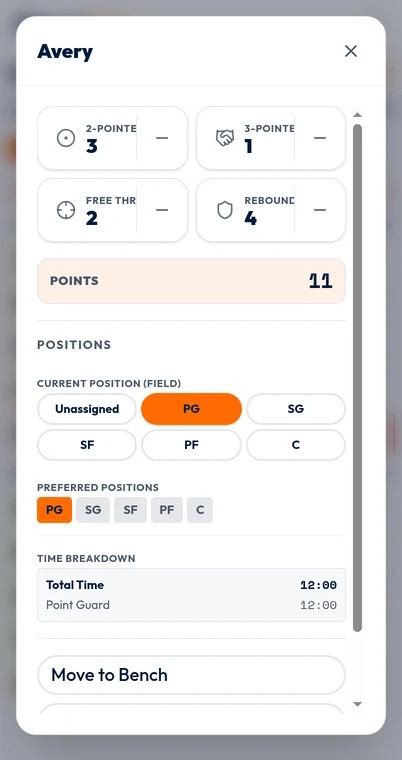
BenchClock’s basketball quick-stat preset includes 2-Pointer, 3-Pointer, Free Throw and Rebound. The scoring values are two, three, one and zero respectively. These are manually recorded events, not automatically recognized plays or a complete basketball box score.
For a fictional example, two recorded two-pointers, one three-pointer and one free throw produce eight player-attributed points: 2 × 2 + 1 × 3 + 1 × 1. Three recorded rebounds do not add points. That calculation describes the entries made, not proof that every basket was captured.
Player scoring stats automatically update Us. If the team score reads 22 while recorded player events add to 18, the breakdown shows four other points or adjustments rather than assigning them to anyone. Perhaps a basket was missed, a scorer was uncertain or the scoreboard was corrected. Reconcile only what you can verify.
This separation can be useful when you want a match score but do not have capacity to identify every scorer. It is unsuitable if you expect automatic reconciliation without manual work. Make that expectation explicit during product selection.
Test the workload and correction boundaries
Run a short simulated sequence: a basket, a rebound, a stoppage, two substitutions and another basket. Record only events you could genuinely observe while doing your coaching job. Count how often you look down and whether any substitution is delayed because you are entering an optional stat.
BenchClock’s quick-stat controls allow manual increments and decrements. Separately, Tools, Undo & correct can preview a new elapsed time for a substitution with reconstructable journal evidence. That recalculates player and position totals while leaving clock, score and stats unchanged; it is not a general editor for every historical interval.
Ask what evidence supports a correction. If you know a three-pointer was entered twice, remove the duplicate. If you only know someone played ‘a bit longer,’ avoid turning that uncertainty into an exact minute figure. An honestly incomplete record is more useful than invented precision.
Minutes-only operation is a valid outcome of this test. You can add one reliable stat later. More recorded categories are not automatically better information if the same person cannot observe them consistently.
Check history, then make a narrow decision
If season review matters, ask how completed matches are retained, which account roles can view analytics and whether changed stat definitions remain distinguishable. A points-per-minute comparison is only meaningful when both the points and minutes were recorded on comparable terms.
BenchClock’s connected team reports require sign-in and appropriate access. The screenshot here is the real local basketball player editor, showing the inputs used to record quick stats. It is not an authenticated team report, a season trend or a screenshot of a five-player court.
Before choosing, mark your required features as verified or untested: court-minute controls, substitution clarity, scoring entry, scoreboard breakdown and authorized history. Check current product terms directly. Open /app to rehearse BenchClock with fictional players, and choose the smallest reliable workflow that lets you keep watching the game.