
Court minutes depend on your clock policy
To track basketball minutes, record which players are active while a defined match timer runs. The hard part is not the arithmetic. It is keeping that timer and the on-court group aligned through whistles, timeouts, substitutions and period breaks.
First decide whether your record follows the official elapsed playing time or a simpler running observation clock. If you follow a stop-clock competition, pause and resume your manual tracker with the game clock. If your competition uses a running clock with exceptions, follow those actual exceptions. Local rules differ; neither every whistle nor every dead ball necessarily means the same thing in every youth competition.
Do not mix the two policies within a game. A first quarter measured by official time and a second measured by wall-clock time produce misleading totals. BenchClock does not synchronize itself with the venue clock. If nobody can reliably operate a second clock, describe your numbers as approximate participation observations rather than official minutes.
Set up the court before recording anything
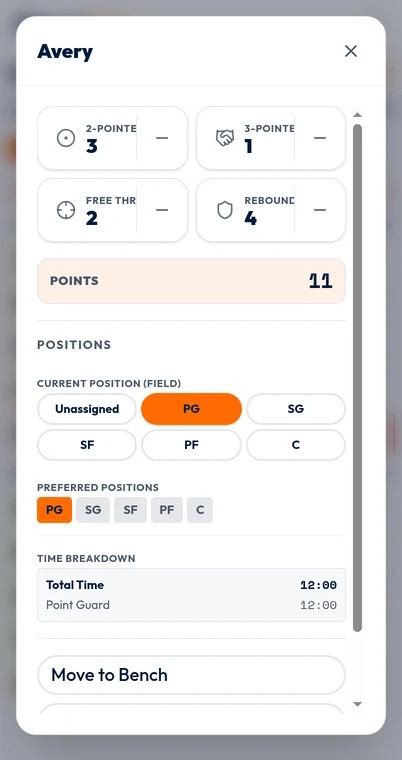
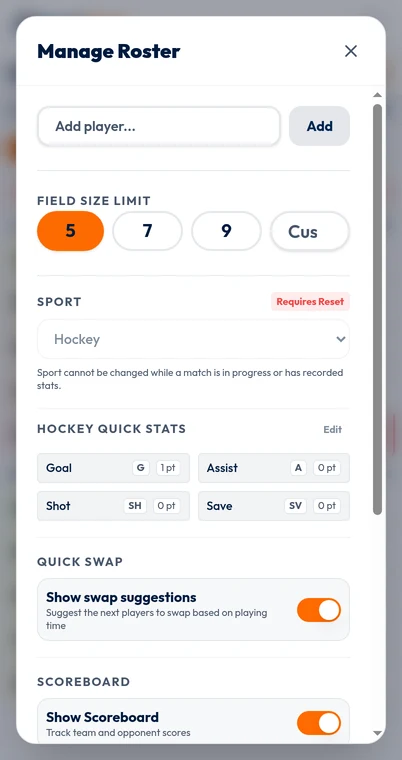
Open /app and choose the local workflow for an account-free rehearsal. In settings, select Basketball before the match has time or recorded stats. Confirm a field limit of five for a five-on-five game; changing the sport preset does not set the limit for you. If your event uses another format, use its actual player count instead.
The shared tracker may use the word Field for the active group. In a basketball session, read that as the players currently on court. Add the available roster, put the actual starting five in that active group and leave the others on the bench. Check names against jersey numbers or another identifier that your recorder can recognize quickly.
Position tracking is optional. You do not need to identify a point guard or center to measure participation. If changing roles are hard to observe, leave that extra layer out of the first match. You can still record meaningful minutes with a dependable five-player active list.
If using the scoreboard, recorded player scoring stats automatically update Us. Them remains manual, and the Us controls can record unassigned points or corrections without changing player stats. Do not let score entry distract from the participation task you set out to perform.
Use a repeatable routine at a substitution
When your measured playing time begins, start the tracker. For a substitution during a clock stoppage, pause it if your clock policy requires that pause. Confirm the players actually leaving and entering, complete the swap in the app, count the active group and resume when measured play resumes.
Record an actual entry, not the moment a substitute walks toward the table. A planned change can be delayed or cancelled. If you replace three players, make three correct changes and verify the final five. A missed outgoing player can inflate the team total; a wrong incoming name can misallocate minutes without changing the total at all.
For example, in a fictional eight-minute quarter, the official clock stops with 5:10 remaining. That means 2:50 of that quarter has elapsed, not 5:10. If this is the first period, a count-up tracker following official elapsed time should be around 2:50. Pause, enter Jordan for Sam and resume at the restart. Sam retains the first 2:50; Jordan starts accumulating court time from the restart.
Between periods, keep the tracker paused and verify the next lineup. Updating the displayed period is bookkeeping; do not assume it automatically performs your pause or resume. The human recorder remains responsible for both timer state and active players.
A 32-minute example catches the largest errors
Suppose a fictional game contains 32 measured playing minutes with five players active throughout. The team budget is 5 × 32 = 160 player-minutes. With eight available players, 20 minutes each would be an equal-share reference. This is an arithmetic example, not a claim that youth basketball universally uses 32-minute games or equal-time rules.
A player who participates for the first five minutes, returns for seven minutes in the middle and plays the final eight has 20 minutes in Total. The live Stint view shows the current uninterrupted active interval, but BenchClock does not turn those spells into a historical stint-analysis report.
If all player totals sum to 172 minutes, inspect whether the tracker ran through breaks or an extra player stayed active in the app. If the sum is 150, inspect missing active players, late starts or overlong pauses. Those are possible explanations, not a diagnosis: an actual period with fewer than five players changes the expected budget.
The same budget idea is described in Basketball Manitoba's playing-time guidance. Its arithmetic remains useful, but your match duration and participation policy must come from your current competition. A balanced total is a consistency check, not proof that each child's record is correct.
When the recorder misses a moment
A single coach may need to supervise players, handle an injury and speak with an official at the same time. Plan for imperfect data. If you lose the thread, first make the current active five accurate. Then note the approximate missed interval and who was involved outside the tracker.
Do not pause the app for an arbitrary extra minute later to compensate for an earlier late pause. If a confirmed substitution has reconstructable journal evidence and a known elapsed time, Tools, Undo & correct can preview a supported correction; it leaves the clock, score and stats unchanged. Otherwise keep the uncertainty attached to the affected interval rather than inventing precision.
If another adult can record, agree on a short callout: 'Sam out, Jordan in; clock still stopped.' Have one designated input owner rather than two people independently tapping changes. Rehearse names and the pause routine before the game so the recorder does not have to learn the interface during a crowded substitution.
- At breaks, compare the active five with the real lineup.
- Compare cumulative elapsed time with the official clock using the correct period.
- Write down uncertain intervals rather than hiding them.
- Pause after the final measured play and review before resetting.
Make minutes dependable before adding a box-score workload
The basketball preset includes manual 2-Pointer, 3-Pointer, Free Throw and Rebound inputs. They can be useful, but recording every event adds work. If your priority is participation, it is reasonable to track minutes alone until the substitution routine is reliable.
Use the final review to identify a concrete next step: an earlier first spell, more predictable rest, or a recorder for the next fixture. Minutes do not explain shot opportunities, defense, injuries or a player's comfort on court. Avoid treating a low total as an explanation of effort.
The pictured player editor is a real source-input screen with fictional data, not an official basketball box score. Open /app for a short rehearsal, keep five fictional players active and practice a stopped-clock substitution. Connected-team history and reporting are separate signed-in workflows; local browser state should not be mistaken for a shared team archive.