
Minutes describe opportunity; scoring describes recorded events
A player with more recorded points may also have had substantially more court time. Reading those two measures together makes the comparison more informative, but it does not turn it into a measure of ability. Minutes describe participation under your timing policy. Scoring counts the scoring events someone actually entered.
Start by asking whether both inputs are trustworthy. Was the active lineup kept current? Did the recorder follow the same clock policy all game? Were baskets recorded consistently for every player, or did attention shift halfway through? A tidy calculation cannot repair incomplete observation.
This guide uses fictional numbers and BenchClock's basketball preset to show the reasoning. It is not a scouting model or a recommendation to rank children by points per minute. The useful result is a better question about opportunity and observation, not a verdict on who deserves to play.
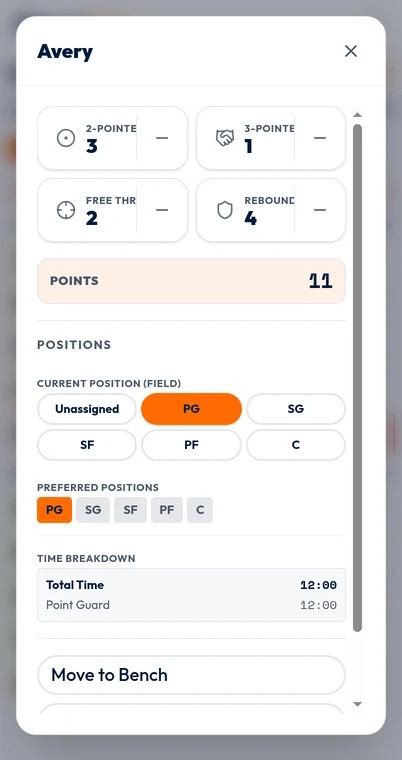
Know exactly what the four quick-stat inputs mean
The default basketball quick stats are 2-Pointer, 3-Pointer, Free Throw and Rebound. Their scoring weights are 2, 3, 1 and 0. With those unchanged definitions, the recorded scoring total is twice the two-pointer count, plus three times the three-pointer count, plus the free-throw count. Rebounds do not add points.
Use scoring inputs for made baskets or made free throws, not attempts. A missed three should not be entered as a 3-Pointer just because it was a three-point attempt. The default four inputs do not provide made-and-attempted shot pairs, so they cannot produce a valid shooting percentage on their own.
Open the player's detail editor to add or remove a recorded event. Correct an accidental tap promptly while the play is still clear. If you did not observe an event, do not fill in a plausible number afterward. Absence of a recorded event can mean it did not occur or that it was missed by the recorder.
Quick-stat definitions can be customized before the match has time or recorded stats; do not assume every basketball record uses the defaults. If your team repurposes a slot or changes a scoring weight, read its saved meaning before combining it with another match. A label that looks similar is not enough to establish compatibility.
Understand how scoring reaches the scoreboard
Entering a player's made two-pointer automatically adds its configured value to Us on the scoreboard. Changing Us with the scoreboard controls records unassigned points or a correction; it does not assign points to a player. Them remains manual.
That distinction can be useful when you know the game score but missed the scorer: add an unassigned score without inventing player attribution. Suppose the scoreboard says 28 and recorded player scoring sums to 24. Check the visible other-points adjustment for missed baskets, incorrect scoring categories, duplicate entries or an incorrectly entered score. Do not distribute four imaginary points across players just to force agreement.
The venue's official scorekeeping process remains authoritative for the competition. Your coaching record is a separate observation. Note discrepancies that you cannot resolve and keep them visible when discussing the numbers.
Worked example: different totals, different opportunities
In a fictional match, Avery records 18 court minutes, three two-pointers, one three-pointer and two free throws. Avery's recorded points are 3 × 2 + 1 × 3 + 2 × 1 = 11. Blair records nine court minutes, two two-pointers, no three-pointers and two free throws: 2 × 2 + 0 × 3 + 2 × 1 = 6.
The raw comparison is 11 versus 6. A rate per ten court minutes gives Avery 11 ÷ 18 × 10, about 6.1, and Blair 6 ÷ 9 × 10, about 6.7. The arithmetic changes the apparent ordering because Blair had half as much recorded opportunity.
Neither ordering tells you who played better. Blair may have faced a different lineup, received different shots or taken free throws in a short late-game spell. Avery may have created opportunities for teammates or handled a difficult defensive assignment. Those explanations are possibilities to investigate, not facts implied by the numbers.
One additional made two-pointer would raise Blair's rate to about 8.9 points per ten minutes. That is a large change from one event in a small sample. Keep the raw points and minutes beside any rate so readers can see why the estimate moves.
Choose the denominator before comparing players
Use each player's recorded court minutes, not the team's full game duration or their time at the venue. If someone played nine minutes in a 32-minute game, dividing by 32 answers a different question and hides their limited court opportunity. If recorded court time is zero, a per-minute rate is undefined; it is not zero and should not be calculated.
For a coaching worksheet, choose a minimum-minute review threshold in advance and show it openly. You might decide not to discuss rates below ten recorded minutes in a particular review. That is a local caution for your workflow, not a scientifically validated threshold. It does not make an eleven-minute sample stable.
Across compatible matches, add the recorded points and add the court minutes before dividing. Do not take a simple average of one two-minute game's rate and one twenty-minute game's rate; that gives the short appearance disproportionate influence. Also check whether your timing method changed between matches.
Use the combination to ask about development
A useful review might notice that a player had substantial court time but few recorded scoring events. Ask what kinds of possessions they experienced, whether they had chances to handle the ball and whether your recorder was complete. Do not jump from 'few recorded points' to 'low contribution.'
The default inputs omit much of basketball: assists, turnovers, defensive positioning, screens, spacing and many other actions. Even adding more manual categories would not remove the need for context. A single observer also has a limited attention budget; better definitions and fewer reliably captured events can be more valuable than an ambitious but incomplete stat sheet.
Choose a practice question that you can observe directly, such as whether each player gets opportunities to finish near the basket or make a pass after drawing a defender. Keep that plan separate from claims that a scoring rate predicts future performance.
- Check minutes and clock policy before calculating rates.
- Verify the saved stat definitions and point weights.
- Show raw points, raw minutes and known recording gaps together.
- Do not infer shooting percentage from made baskets alone.
- Resolve discrepancies with evidence, never invented events.
Start with honest inputs, then use the appropriate report
The image here is the real local basketball input editor with fictional demonstration data. It shows how scoring events are entered, not the connected-team analytics report. Reports require an account and the appropriate team access.
Connected-team reporting requires signing in with appropriate access; authorized coach and assistant views are not the same as unrestricted public reports. Check the selected matches, available started or completed records and compatible saved definitions before interpreting a report. Local browser tracking is a useful rehearsal but should not be described as a connected-team archive.
Open /app to practice recording a made two-pointer, correcting an accidental extra tap and checking the scoreboard breakdown. Once those inputs and your minutes are reliable, the comparison above can support a modest, transparent coaching review.