
Start with what the person needs to do
Sharing match information is not one permission. An assistant may need to operate a match; a parent may need an approved connection to a player; a relative may only want to follow a single live event. Choose the smallest access path that answers the request rather than giving everybody a coaching role.
BenchClock separates assistant invitations, parent/family invitations with approvals, and spectator match links. Connected team features require accounts and the appropriate permissions. A spectator link is different: anyone who has that link can view its public match information and may forward it.
Before inviting anyone, decide who owns team administration and who can answer access questions. This product-maker tutorial explains the current BenchClock paths. It is not a substitute for your club's privacy policy or permission to distribute children's information.
Use an assistant invitation for actual coaching help
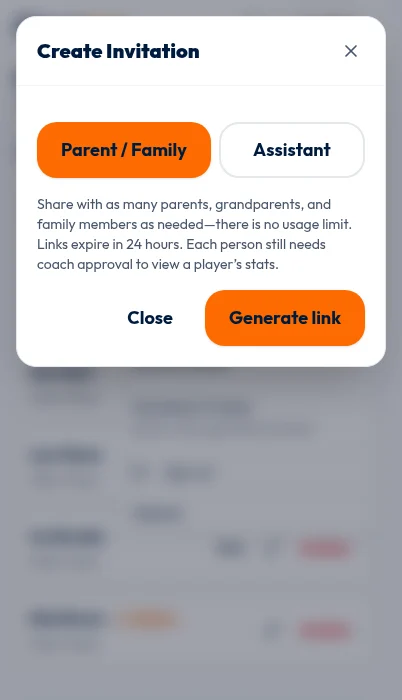
A coach can open Invitations on the team and select Invite. In Create Invitation, choose Assistant, then Generate link. Assistant links are single-use and expire in 24 hours. Send the link directly to the intended adult rather than putting it in a large group chat.
The recipient signs in to accept the invitation. If it has expired or has already been used, generate a fresh invitation after confirming the intended recipient. Do not solve a sign-in problem by lending someone the coach's account. Separate accounts let the application apply the correct role.
Assistants can work with connected matches and access team analytics when authorized, but an assistant role is not a promise of all coach administration controls. Roster and team-setting administration have coach-controlled actions. Agree in advance who will maintain the team and who will operate match-day controls.
For a fictional Saturday match, one adult might decide substitutions while the assistant records them. Give the assistant the same event definitions and clock convention as the coach. Permission to edit does not by itself prevent two adults from entering the same event.
Treat family access as an approval process
In Create Invitation, choose Parent / Family for relatives who need a family connection, not match-editing controls. The interface explains that these links may be used by multiple family members, expire in 24 hours, and still require coach approval for access to a player's stats.
Receiving or accepting the invitation is not equivalent to approval for every player. Review team-entry and player-connection requests carefully. Confirm the requester through your established team communication channel if the account identity is unfamiliar. A plausible display name alone is not sufficient evidence of the relationship.
Use the Approve or Reject actions for the appropriate request. The team interface distinguishes a team-entry request from a player connection, so make sure you are reviewing the right item. A parent who sees no approved players may still be waiting for the necessary player connection rather than encountering a broken roster.
Explain this sequence in the message you send: sign in, accept the invitation, request the appropriate connection if needed, and wait for approval. Avoid promising that every invited person will immediately see all records. Parents are not granted coach/assistant analytics access simply because they are connected to a player.
Use spectator sharing for a public match view
A prepared connected match can be shared before its clock starts. In the match's sharing control, open Spectator sharing and select Enable sharing. Copy the generated link and send it only after checking the intended public names and the information visible in the public view.
The interface warns that anyone with the link can view the live match and may forward it. Treat the URL as a bearer link, not as a private message that can only be read by its first recipient. Do not put confidential notes into a match title or public player name.
Existing spectator tokens are not displayed again simply because sharing is active. If you return later and no copyable URL is available, Rotate link creates a new link. Communicate the replacement to your intended recipients; an old forwarded URL is not the one you should continue distributing.
Revoke turns off that spectator link's access. Revocation is useful when an event ends or a link reaches the wrong audience, but it cannot recall a screenshot or information someone already copied. Share conservatively from the beginning.
Review names before reviewing scores
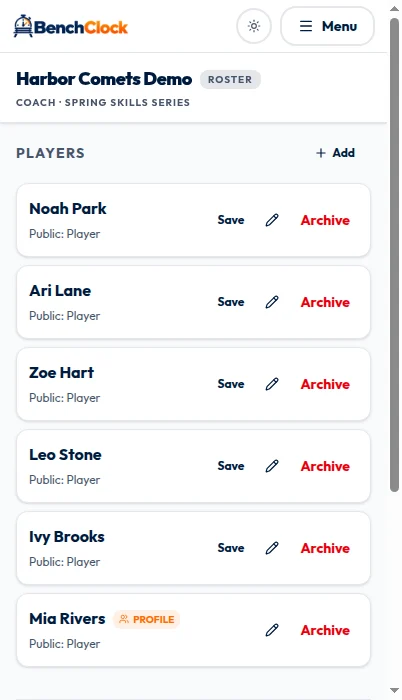
Choose public player names deliberately. The connected roster supports public display names, and the spectator dialog says it uses coach-configured public names. A public label can be less identifying than the name the coach uses internally. Follow your organization's consent and safeguarding practices rather than assuming one naming pattern is always safe.
The screenshots show the connected invitation role chooser and the synthetic demo roster whose public names should be reviewed. The chooser does not show a generated link, an accepted invitation, coach approval, or the spectator page, so it is not a complete preview of what any role can access.
Avoid posting a full-team report when the real request concerns one player. An exported report is a separate copy with its own privacy implications. Public recap images and PDFs omit private IDs, availability and correction details; private CSV exports contain coach-entered data. Downloaded copies cannot be revoked. Someone having a match link does not establish a need for a season-long spreadsheet.
- Assistant: needs operational coaching access; invite individually.
- Family: needs an approved player connection; review requests.
- Spectator: needs a link-based public match view; assume forwarding is possible.
- Report recipient: needs a justified, limited data extract; review it separately.
Have a simple recovery and offboarding routine
If a recipient cannot get in, ask which path they are using before creating another link. An expired invitation, a pending player approval, a revoked spectator URL, and signing into the wrong account are different problems. Keep private URLs out of public support messages or screenshots.
When an assistant leaves or the season ends, review memberships and invitations rather than assuming old links and accounts no longer matter. Revoke access that is no longer appropriate. For spectator sharing, decide whether the event's link should remain enabled and act on that decision.
Open your connected team when you are ready to invite people, then test the intended access with an authorized adult before match day. A clear explanation of who can see what is more helpful than sending the same link to everyone and resolving confusion at kickoff.